How can I fix the 503 Unavailable Error?
It is quite intimidating to run into errors. There are some errors that give some clue regarding the source of errors. But error 503 service unavailable is not as generous and polite.
Let us understand this more simply:-
Suppose someone is searching for a topic and finds your link on Google. When they click your link, they find a “503 Unavailable Error” message with a blank page. A disheartened and unsatisfactory situation.
Do you think they will look for ways to get through your website?
No!!
They will simply skip your and tap on to the next link. What would you do? You will do exactly the same, No doubt!!
You must offer solutions to your visitors if they are looking for answers rather than a 503 Unavailable Error. In this case, your clients lose interest in you and will not trust your brand.
There is no exact silver bullet answer for “HTTP error 503 the service is unavailable”. You need to actually investigate the cause of the error.
Last year in June, we witnessed many sites showing the error 503 service unavailable message. Prominent sites such as gov.uk, Quora, Spotify, Reddit, PayPal, HBO Max, Stack Overflow, and GitHub were affected.
There were also many prominent online newspaper websites that faced HTTP error 503 the service is unavailable tremor. They were Financial Times, New York Times, The Guardian, The Verge, CNN, BBC, etc. The situation was so bad that they used Google Docs to publish their stories.
The service provider of cloud computing described this specific issue, “503 Unavailable Error” as a global CDN disruption. They even had their own websites that displayed an “I/O error” message during that time.
Here, we will discuss some best ways to fix error 503 services unavailable. Without wasting any time let’s delve further.
An overview of error 503 service unavailable
The servers that host the web pages accept the requests from devices or web servers. It then utilizes a bunch of varied status codes and communicates back.
The status codes are aligned in varied classes. This is signified by the status code’s first number.
- 1xx
It is an information phase wherein the server processes the requests.
- 2xx
In this phase, the request is succeeded. The server starts by giving responses to the resources as well as pages.
- 3xx
This is a redirection phase. As per the movement of the resource page, the server will give a response according to the new location.
- 4xx
It is denoted as the Client error. So, in this situation, the error takes place in the request from the device or browser.
- 5xx
The error takes place at the server end.
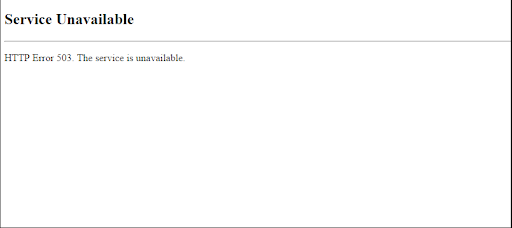
There are status codes that go totally unnoticed. Up to some extent, it is okay because everything works. But the problem arises with the 5xx and 4xx ranges. You will notice the status code because you will see the page as:-
What is 503 Unavailable Error?
503 Unavailable Error signifies that your web servers are unable to process your request temporarily. But the most common two cases are as below:-
- Have the maintenance regulated on it
- The server is overpowered with the requests simply
The “HTTP error 503 the service is unavailable” means that the server is working fine. It can process the request but is returning with a 503 Unavailable Error by design.
You can hire experienced teams to fix WordPress-related issues like HTTP error 503 the service is unavailable. As you require a partner who uses methodological processes to fix the troubleshooting errors. It means that they have to follow numerous steps to find the location of the root cause.
One can do the customization of the “error 503 services unavailable” page. For this, you can hire a web designer from a leading web designing company.
Now if your luck works, error 503 services unavailable will occur when your WordPress site is under maintenance.
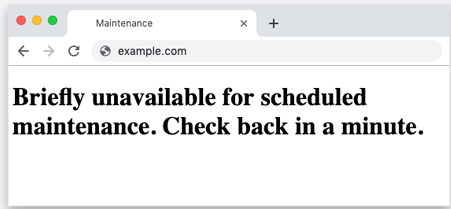
You may see 503 services unavailable error WordPress with different names. You can see things such as:-
- HTTP 503
- http/1.1 Service Unavailable
- Service Unavailable – DNS Failure
- 503 Service Unavailable
- 503 Service Temporarily Available
- HTTP Error 503
- Error 503 Service Unavailable
- 503 Error
Note:-
You may see 503 services unavailable error WordPress when there are server-side warriors. It denotes that the issues exist with the website when accessing.
This is equally bad as well as good news. The good news is that your computer is working fine and the bad news is you cannot do anything to sort the problem related to 503 Unavailable Error.
The application of Windows innately accesses the internet. An error 503 service unavailable may return with the error message “HTTP_STATUS_SERVICE_UNAVAIL”. You can even see the message, “ The service is temporarily overloaded”.
Even the updates from Windows may not report a 503 Unavailable Error. On the other hand, it will display WU_E_PT_HTTP_STATUS_SERVICE_UNAVAIL or 0x80244022 error code.
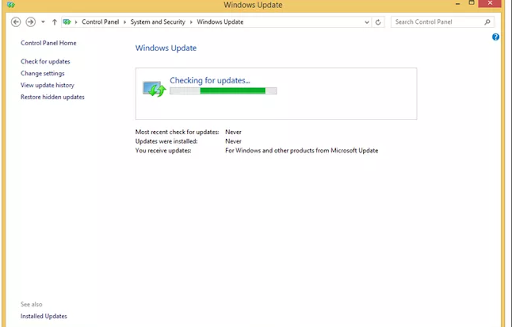
You may see some other messages such as Connection Failed (503), 503 Over Quota for error 503 service unavailable. But these are not that common.
Suppose your website reports error 503 service unavailable while you run the IIS web server software of Microsoft.
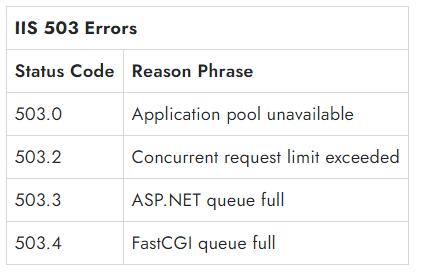
How to fix HTTP error 503 the service is unavailable?
1. Check the URL
You can refresh and try back to the URL from the address bar again. Press “Ctrl+R” or “F5” from your keyboards and refresh your contents.
It’s true that the 503 Unavailable Error simply means that there is no error on your computer. Even though this issue is temporary, refreshing the page will solve the problem.
2. Restart the modem and router
If you are seeing a 503 Unavailable Error, you should restart your modem or router. It may happen because of a DNS failure error or if there is any issue while doing the configuration of the DNS server on your computer or router. A quick restart may solve your problem.
3. Restart the server
An effective way is to simply open and refresh to restart the webserver simply. Now, if you have hosted your website on multiple servers, you should restart them all to get it all running again.
4. Fix the configurations of the faulty firewall
The firewall is the gateway for any website. Hence, it is good that you protect your website from DDoS (Distributed Denial-of-Service) attacks or malicious visitors. At times, faulty firewall configuration may stop or reject the requests. This ultimately results in error 503 service unavailable.
5. Analyze the server-side logs
- Server logs:
It gives the details regarding the hardware that is running on your server.
- Application logs
This will recount the entire history of your website. It will allow you to see the web pages that the visitors requested and the servers connected to them.
This will assist you in uncovering any alarming details related to your website or server.
6. Check the codes of your website to find bugs
If there is a mistake in the codes of your website, the web servers may not be able to process the requests. You need to go line by line to check and find the codes. Next, you must copy this code to the development machine.
It will process the complete debug and simulate the issues that lead to 503 Unavailable Error.
Now, you will also see a 503 Unavailable Error message when your website has huge traffic. This can overwhelm your website. You need web traffic management in this case.
To fix this, you can do WP Support Chat from a leading WordPress development, designing, and maintenance company.
WP Customer Support can assist you to fix errors such as 503 Unavailable Error, 502 error, and many more.
Why should you hire us?
- Affordable service costs
- Hi-tech services
- 24×7 Support
- Great Client Retention rate
- Amazing taste
What are you thinking of, buzz us @ +1800 556 3577 and let our developers solve your problem!!